How to make football call sheets and wristbands that match (step-by-step)
Build a football call sheet and wristband inserts whose numbers match: shared numbering, youth wristband sizes, formation ordering, backups, and AI workflows.
3865 Plays is a browser-based playbook builder for football coaches: keep plays in a tag-driven Library, turn them into a printable call sheet, and print numbered wristband inserts whose numbers match the sheet exactly.
How do I organize my football playbook?
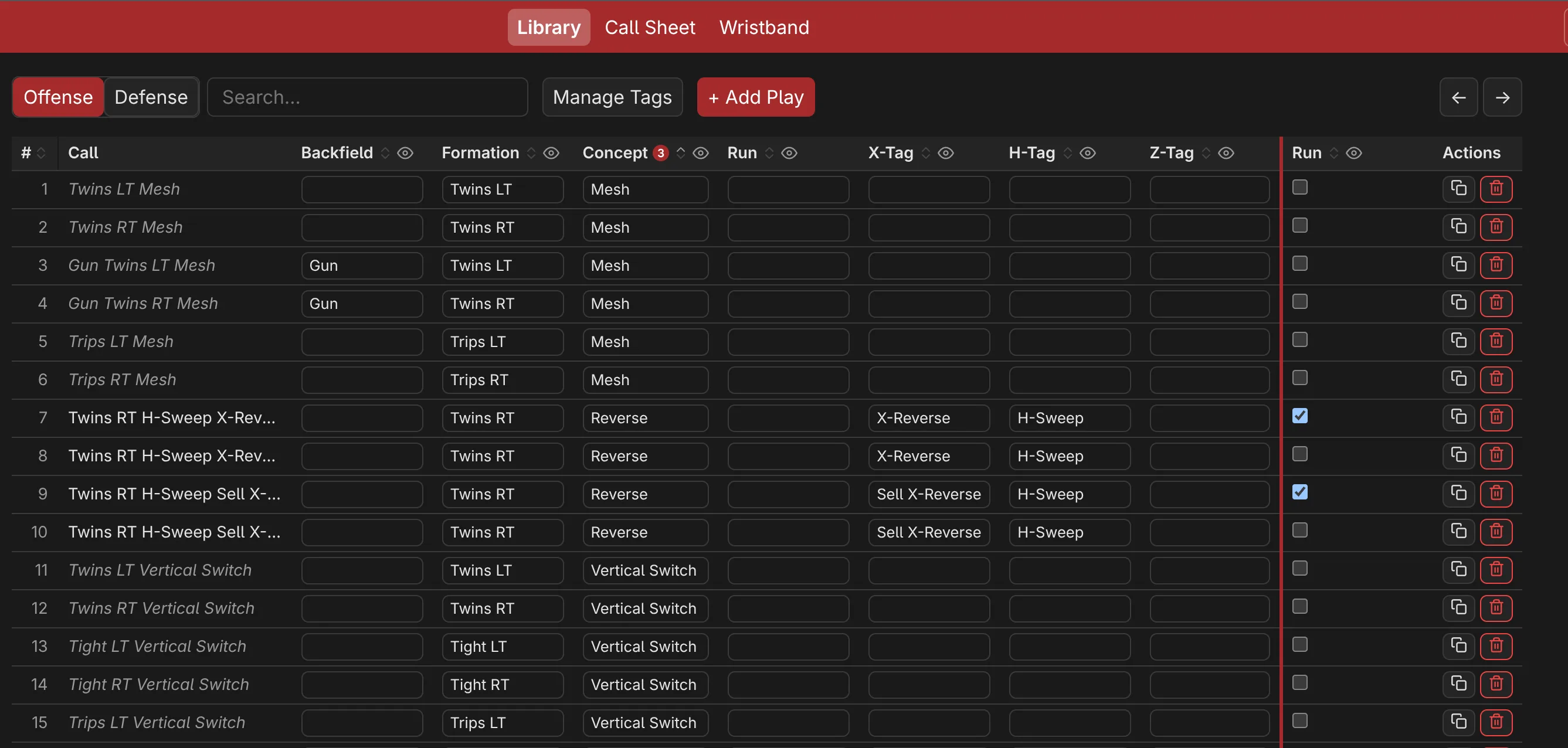
The Library is your playbook database, which purposely feels very similar to a spreadsheet interface. Each play consists of a set of tags such as Formation or Concept. The philosophy behind this is that you build your plays from similar building blocks every time. Additionally you can add categorizations which can help creation of call sheets later when you might want to group plays by down and distance, field position, blocking scheme to quickly find plays when you're on the sideline.
The main interface gives you lots of options to find your plays quickly such as searching, filtering, sorting, ... Adding new plays is also easy: you can duplicate an existing play or create a new one. Each field lets you easily select a previously entered option or fill it how you like. Everything autosaves to your local browser.
Play names are automatic by default (e.g., "Trips Left Smash"). You can control this behavior with the include in name option or you can override the name for each play by typing into the cell directly.
Can other people see my playbook?
Playbooks live in your browser’s local storage on your device. NOTHING syncs, uploads, or requires an account. Export to JSON for backup, and delete your browser data to erase everything.
How do I make a call sheet that matches my wristband numbers?
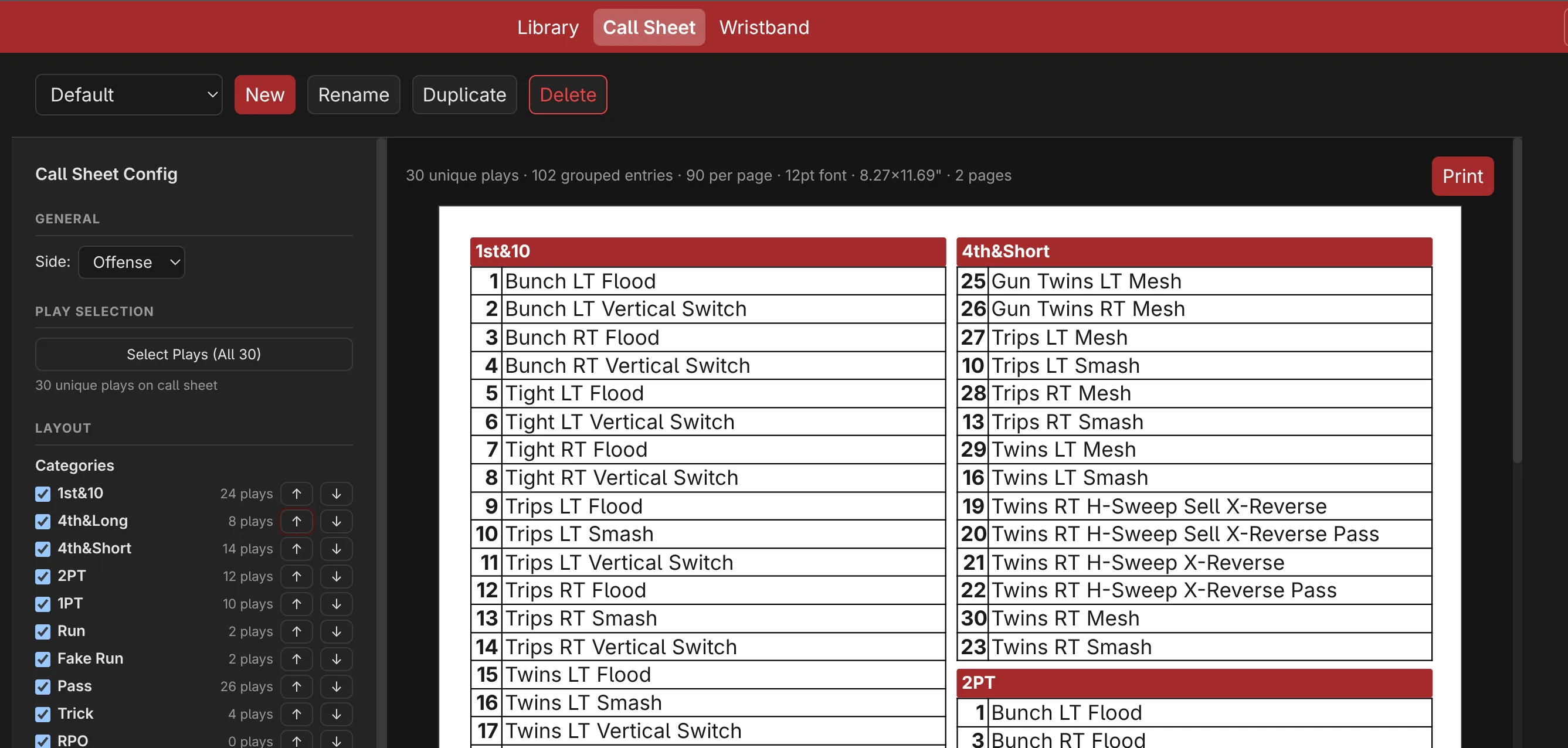
Open the Call Sheet tab and choose a combo (for example “Game vs Tigers”). A combo consists of a set of plays that will appear matching on call sheet and wristbands. Numbering is shared by default: each play gets a single sheet number used on the call sheet and on the wristband card, so the wristband number is always the call sheet number.
Groupings on your call sheet are easily derived from categorizations of your plays. The order of the categorization list sets the group order on the sheet. A play carrying two categorizations can appear under both groups, keeping the same play number.
Use the layout settings to customize your call sheet easily: number of columns or rows, lines or no lines, category and tag colors, alternating shading to increase readability, and font size (or automatic for maximal size that fits your fields). Content size is set in inches and is decoupled from the paper it prints on.
What is the best wristband size for youth football?
There is no universal size. Insert windows vary by brand and age group, and the card that prints must match the inside of the window, not the outer band. The reliable method: measure the window opening of your wrist coach edge to edge (or an existing insert), enter that exact width and height in the Wristband tab. Typical ballpark sizes for triple-window wrist coaches:
| Player level | Typical insert window | Card size to start with |
|---|---|---|
| Pee-wee / young flag | 2.75–3.5″ wide × 2–2.25″ tall | 3.5″ × 2″ |
| Youth (10–14) | 3.5–4.5″ wide × 2.25″ tall | 4.25″ × 2.25″ |
| Adult / high school | 4.75–5.25″ wide × 2.5–3.25″ tall | 4.75″ × 2.5″ |
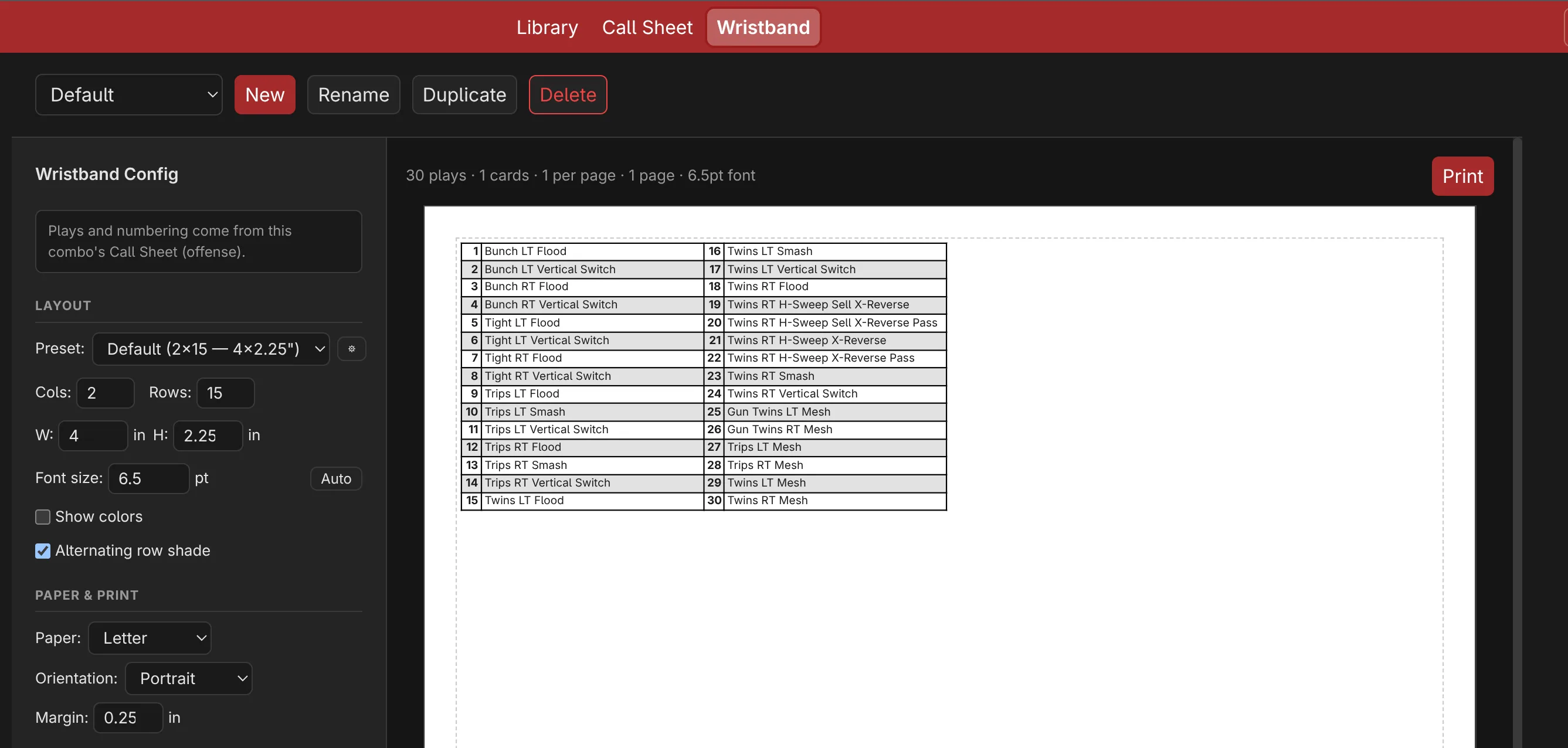
How many plays fit on a wristband? Capacity is simple math: columns × rows per card. The default preset is a 2 × 15 grid on a 4″ × 2.25″ card resulting in 30 calls per card, and with three windows a player can carry three cards for a total of 90 plays. For younger players especially, prefer fewer plays with larger fonts, as too many plays will do more harm than good.
Wristbands are not just for quarterbacks. Receivers, flag defenders, and linemen all benefit from the same numbered cards. But you're the coach, you decide who gets a wristband and how you call your plays.
How do I print wristband inserts that actually fit?
Open the Wristband tab. All plays are automatically included based on the active combo's play selection.
- Grid: columns × rows
- Card size: exact width and height in inches. Enter your wristband's sizes once and save them for later.
- Font size: leave empty for automatic sizing, or set an exact point size.
- Colors and shading: tint cells by tag color and toggle alternating row shading and cut guides.
- Paper: pick the physical paper, orientation and margin independently of the card size. Cards auto-pack onto pages and the preview shows the live card and page count.
How do I back up my playbook and move it to another device?
Click Export in the header to download 3865-plays.json which contains the full playbook (schema version 2): tag categories and values, categorizations, plays, combos, wristband presets, and view settings. Imports are validated and limited to 5 MB (easily 1,000 plays); the previous browser state is backed up before an import replaces it.
Remember! Once you import a new playbook, your current one will be lost. Always keep a backup of your original file.
Can ChatGPT or Claude help organizing my playbook?
Yes. There is no direct integration and nothing is sent automatically; you stay in control. The workflow works with any AI assistant:
- Click Export to download your
3865-plays.json. - Download the AI format guide below and share it with ChatGPT or Claude together with your exported file.
- Ask the model to add, rename, retag, or regroup plays and return a complete JSON file.
- Click Import to load the returned file. If validation fails, the app keeps your current playbook and shows the reason.
Download the AI format guide (Markdown)
The guide documents the input format (the exported file), the output format (a complete file with preserved IDs), the simplified label-based play notation the model should author in, the auto-naming and ordering rules, the size limits, and a ready-to-paste prompt. Tip: ask the model for small batches of changes first, and always keep your exported backup until the imported result looks right on the call sheet and wristband.
How do I get a clean print at the right size?
The preview is the print document at true size. Paper, orientation, and margin describe the physical page; content or card size describes what prints on it: the two are independent by design. Use the browser print dialog for copies, keep scaling at 100% (“actual size”, not “fit to page”), and double-check the oversize warning before printing.
Quick answers
- What is the best wristband size for youth football?
- There is no universal size, insert windows vary by brand and age group. Measure the inside of your wrist coach's window and enter that exact card size in the Wristband tab. Common triple-window starting points: 3.5 × 2 in (pee-wee), 4.25 × 2.25 in (youth), and 4.75 × 2.5 in (adult).
- How do I make a call sheet with numbers that match my wristband numbers?
- Open the Call Sheet tab and pick the same combo you use in the Wristband tab. 3865 Plays computes one shared number per play, so wristband card 12 is always call sheet play 12.
- What is the difference between a call sheet and a wristband?
- The call sheet is the full game plan printed on paper; the wristband is the numbered mini version players wear on their arm. In 3865 Plays both come from the same combo and share one numbering, so the numbers always line up.
- Does this work for flag football and 7v7?
- Yes. The Library, call sheet, and wristband are size- and scheme-agnostic: tag plays for any formation or concept, group the sheet how you want, and print cards sized to any wrist coach band.
- Do I need an account, and is my playbook private?
- No account needed. Playbooks are stored in your browser's local storage on your own device and never upload anywhere unless you export the JSON yourself. Delete your browser data to erase everything.
- Can I move my playbook to another computer or tablet?
- Yes. Click Export to download 3865-plays.json, then click Import on the other device to restore the exact same playbook. A backup of the previous state is kept before an import replaces it.
- Can ChatGPT or Claude edit my playbook?
- Yes. Export your playbook, share it with the AI format guide (/blog/3865-plays-ai-format.md), and the model returns a complete JSON file you import back. Nothing is sent automatically; you stay in control of what you share.
- Can I print on A4 instead of Letter?
- Yes. Content and card sizes are set in inches and decoupled from paper.